
Nandi8965
Ultimate Guide to Choose The Best Web Development Company in Kolkata in 2020

When you are looking for Best Web Development Company in Kolkata in 2020, it is hard to choose among hundreds of websites listing in a small region near Dum Dum – Salt Lake area, thats why you need to keep some key factors in mind that will help you determine who is the best. In this article we will discuss all the things you should remember while choosing a Web Development Company in Kolkata. [lwptoc] Check How Old is the Company Almost Everywhere Goodwill or Trustworthiness of a company depends on how old the company is, so always check when the company was formed. A simple way to check that is to check the main website domain is how old. You can check all the details of any domain here https://www.whois.com/whois/ paste the domain name of the company’s business website and see when was the domain registered. If the company is claiming to be running for 10 years and domain is just 1 year old, there may be some some underlying truth. Actually there are many web development company in kolkata, and many new companies pop up every month, but most of them do not last over an year due to many reasons. Check Social Presence : Unless a web development company is brand new or run by a old man, all the companies have social presence to some extent. If not everything, it should have a Facebook Page at least and should be some recent posts there which is not years old. If that is not the scenario then you may want to stay away from the company. Now if you are wondering why social presence is important, because it not only build a brand for any business but also helps with SEO and communicate with potential customers. So if the web development company in kolkata does not care about their own social presence, they will not care about your business. Check Their Portfolio : Every web development company in kolkata have portfolio and they boast to show their clients portfolio, mostly on the home page. Check their client’s websites, check for website design and SSL certificates. It may be that the displayed list dont have a clickable link, and thats natural. You need to search with company name and usually first result is their business website. You can also call that company and ask for the feedback of the developer but many times customer executives handle these call and they dont have a clue about what you are asking. Check SEO Score of that web development company in kolkata SEO is a mandatory parameter of running any website long time, so any business with a 5 year plan needs to attend to its SEO, at least for On-Site SEO only. And almost always every web developer in kolkata claims to provide service of SEO for your business. To check SEO Score, there are many free websites which do not need any registration. Neil Patel’s Ubbersuggest Woorank seositecheckup.com You can check in any other Free SEO Checkup tool, but in all of these checking website, the web development company should have a score of minimum 50, lower than that and you will know they dont care about their SEO at all. Check Policy Pages of the website design company in kolkata: There is a common proverb that says “devil is in the details”, which means often the fine print is buried inside the details of the terms. Thats true for every web development company in kolkata as they often hide many facts inside their policy pages, or do not have any policy page at all. Keep in mind, every web development company are bound to have the following policy pages, its a mandatory : Terms & Conditions Privacy Policy / Data use Policy Cookie Use Policy Refund Policy If they are present, read the refund policy successfully, see what are their terms and conditions, they really created one for their business or just copy pasted from somewhere else. Check Pricing for the Kolkata web development company If the business website of the web development company in kolkata has a pricing or package, then great, you can see what features they are offering in what price. But if you dont find any pricing or package list they you might want to stay away they tend to charge anything without any package, what we say that charging according to customer, not the customer requirements. This is a malpractice done by many companies and they are used to haggle over package price by veteran customers. Stay away from such web design company in kolkata. After Sale Service of a website design company in kolkata : This is the most important aspect of any service, after sales service decide whether a customer will purchase again or not, and if he/she will recommend that web development company in kolkata to other persons. What generally happens is that when you call these companies, receptionist take the call and forward the call to the sales person of that web development company. Now these sales person work as commission system and they will promise you heaven and earth to get your project started and they get the commission for that project. But the actual website development is done by a completely separate section – the website developers, and they tend to try and reduce as much work as possible. As a result you are promised the rose by the sales person of that web development company but you get the thorn from the company web developer in kolkata. Learn the Backend System for web development company Websites can be developed using many coding languages, and you should also know web development vs web design. Previously coders used html css design and build web sites but those were static websites. Now a days, PHP with mySQL is used in content systems such as wordpress. So always try to get updated technology and Responsive websites rather than static websites. … Read more
Ultimate Guide on How to Verify Google My Business Listing in 2020 | Instant Success

Google My Business is the most important tool to rank your website in Local SEO and normal search result as well, so verifying your business in GMB Listing is the first task you should be doing if opted for any SEO related work. Getting your business verified in Google My Business listings has several methods, but it depends on two things mainly : In which Country is your business located. Which category of business you have. We will talk about country based methods here, one by one. Requirements for Google My Business Page Before you proceed, keep the following with you Your Business Name – Should be unique, try not to use any generic name or keyword Active Google Account / Gsuite Account on your webmail Business Address which can receive post cards, P.O. Boxes are not eligible Additionally, keep the following with you : Business Logo, if you do not have one, Contact Us we will get done for you Some images of your office / business / organization 1 Image of the Board / banner / Flex mentioning your business name, address and phone number Verify Google My Business in USA Well, if you are living in USA, you are in luck. Not only GMB Verification Service Post cards reach here super quick, but also there are many methods to get verified. Bulk verification & Google My Business Instant Verification is available in here too. First we will talk about the traditional method. Please follow the step by step process on how to get verified via post card. How to verify google my business Via Post Card First go to Google My Business Page Next Sign In with your Gmail from which you are willing to manage this account You cant use any other email other than Gmail or Professional GSuite Mails Alternatively, you can go to Create a Business in Google My Business Website First time, Google will ask your business name – this is the name that will be featured in the Right Side Knowledge Panel of Google Search Try not to use any generic name, otherwise it may not be verified Do not use any keyword as your business name,will get banned eventually Now enter the Address and phone number. Next if you have a website, enter that, otherwise click on “Get a free website based on your info.” After this you can finish and a page with your business name will be created as GMB Listing. Next is to wait for your code to arrive then enter the code and Viola ! Your business is verified in GMB Listing But if you are facing problems like Google Business Verification Code not received, then check with your local post office if they have it. Otherwise, try one of the alternative methods below. Google My Business Instant Verification There are many methods to Verify Google My Business without postcard instantly like phone verification, email verification, video verification, by Google My Business Providers and by product experts but all depends on which category of business you have and how old your business is. If you already have a good reputation online, it helps a lot to get instant verification in GMB Listing. Google My Business verification by phone This option is available only for selected business categories in Tier 1 countries. Also keep in mind some important points. Follow this procedure step by step Head over to Google My Business Help In the “Tell us what you need help with: ” write “Instant Verification” From the options, Choose Instant Verification Click on Next Step Blue Button, do not click any other links If your business falls into Selected category you will get the option to be verified by Phone under “Contact options” Keep the following in mind when trying to get instant verification by phone : First get your website / domain verified via Google Search Console, if you have that, chances for instant verification increases. If your business has many locations, or you want to verify business in bulk, this is the most convenient option. How to bulk verify Google My Business First Sign in to Google My Business Page. Next you will get option to add location group. To add a location group, you need to give them a pre-formatted excel sheet. Next Download Google My Business Template. Next check a pre-filled file to know what data to enter, Get Google My Business Sample. If you want to know about attributes, you can Download Google my Business Attributes File. Fill them up and import as a Location group. Next you will get options to verify business by receiving calls to the business phones you listed in your file. This method of Bulk Verification Google My Business works best for business with 10+ listings or locations. Google My Business Manual Verification Google My Business verification by Email If any of the above methods dont work then follow the procedure described below. Head over to Google My Business Help In the ” Tell us what you need help with: ” wrote Business Verification in Google Click on Video Verification Request Next Click on “By Email” in “Contact Options” There you will get a Contact form where you will need to fill up all your business data, images etc There you will get two options – select “Offline Method” by mail After successful submission, you will get the verification code in mail Google My Business verification by Video Call Follow the same method as described above till point no 5, then Select Video verification Give a convenient time and date as per your choice This is done by showing Google Representative Live video feed in your office Install Hangouts app in your phone / laptop / tablet, since you can not move PC, it is not advised to use that Login to hangouts using the same email id you have used to request in the form Someone authorized from Google will contact you in Hangouts on … Read more
Ultimate Guide to Whatsapp Web | Enable Dark Mode in 1 minute
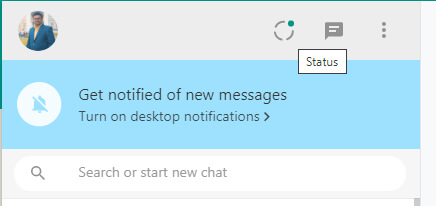
Many of us try hard to get into whatspp on their pc or mac but fail to do so because they have no idea how to do that. Specially non tech savvy people who are unaware of the system falls into this problem. In this article we will not only talk about whatsapp web download location, but also its various features as well as some tutorials and solutions of common problem. How To Set Up WhatsApp Web Browser Version To use whatsapp web in your browser, simply go to WhatsAppWeb Browser. Now follow the steps : Open the whatsapp application in your mobile Tap Menu or Settings and select WhatsApp Web Scan the QR Code given in your PC Browser It will sign in Now you can use whatsapp on the web If you are using private computer or laptop, which no one else use, you can check the box that says “Keep me signed in” If you are using a public computer or shared computer you should not click that option. If you unchecked this option, you will be logged out when inactive for few minutes Some people could not find this whatscan for whatsapp web and they are unable to sign in. For best practice, bookmark this webpage, shortcut is ctrl + D if you are using whatsapp web chrome how to add status in whatsapp web You can not add status on whatapp web version, can done only from its mobile app However you can view others status Go to WhatsAppWeb Browser Head over to the left panel where all your chats with contacts are showing Click on the semicircle right side of your profile picture that says status now you can view all others status now you know how to upload status on whatsapp web how to update status in whatsapp web You can not update status on whatapp web version, can done only from its mobile app Follow the the procedure above So if you had questions that can i update my status on whatsapp web, the answer is no you cant not Whatsapp Web Download If you are looking to install whatsapp software for your pc please follow the steps : Head over to Whatsapp Official Website Click on PC or Mac Option It will come to the whatsapp download page Go to the right side of the page Click on the big green button that says WINDOWS-এর জন্য ডাউনলোড করুন (৬৪-বিট) Or Download for Windows (64-bit) Approx 150 MB of installer file will be downloaded After download, click on installer file and it will install Similar screen of QR Code scanning will come like web version After logging in, you can minimize or maximize the screen like any other app Now you know the process of whatsapp web apk download whatsapp web video call You can not do video call or voice call in your pc or laptop, using whatsapp’s web version or whatsapp software downloaded in your pc. So you can use web version without camera because its of no use. However if you use Andoid SDK like Bluestacks it is possible to use whatsapp video or voice call. If you want to know step by step process, please comment below. How to turn on whatsapp web dark mode Many of the users do not know that it has a dark mode for whatsapp as well as its web or pc version. If you are looking for how to turn on Dark Mode on WhatsApp Web, follow this step by step guide : Go to the left navigation panel where your chats are showing in web version or pc software Click on the 3 dots of the top right of the panel Click on settings Inside setting, you will find “Theme” Click on theme You will see two options “Light Mode” and “Dark Mode” By default, Light mode is selected Click on the Dark Mode Click on ok button. Now you know how to enable dark mode on WhatsApp web. Frequently Asked Questions whatsapp web not working If you are facing problems with web whatsapp not working, there may be many reasons : Clear cache of your browser, check this tutorial Clear cache & cookies If you are wondering why whatsapp web is not working, please check that the PC and Mobile are using the Same Internet Sometimes whatsapp web is not working because you are not connected in mobile If you see that whatsapp web qr code not scanning then restart pc browser and mobile phone both when whatsapp web qr code not loading, make sure mobile is same wifi network as pc or laptop If none of the solutions work for you, leave a comment with exact problem below and we will try to solve it. how to add contacts in whatsapp web With the web or pc versions of whatsapp, you can not add contact. However if you use Andoid SDK like Bluestacks it is possible to use whatsapp video or voice call. If you want to know step by step process, please comment below. how to stop auto download in whatsapp web Whatsapp in their web version or pc version dont start auto download by default, its when you click on download, it is downloaded. how to logout from whatsapp web If you are not finding how to logout whatsapp web, here is a step by step instruction : Go to the left navigation panel where your chats are showing in web version or pc software Click on the 3 dots of the top right of the panel Click on logout below settings Now you know whatsapp web logout steps. if you are looking for how to disconnect whatsapp web, follow the same steps above. whatsapp web not downloading files If your web version is not downloading files, its because that file is deleted from your mobile and also deleted by the sender. You can request the original sender to send the file again, then you can download in Mobile or Web … Read more
Responsive Website Examples & Ultimate Overview in 5 minutes

Basically, Responsive Websites are the sites that adjust itself to the resolution of the device you are using. In layman terms, if you opening a non-responsive website, it will show similar in pc and desktop, as a result either one will look bad and not easy to use. But Responsive websites restructure themselves according to pc resolution and mobile resolution, thats why you can get best view possible in any device, any resolution, all across platforms. We will provide you with Responsive Website Examples and other details in this Article. Previously when websites were designed in HTML then the websites were fair viewing on PC or Mac but the view didnt adjust themselves in handheld or portable devices like Mobile or tablet. As a result you could see a horizontal view of the website in mobile devices with very small fonts, which reduce the user experience to a lot. So now you get Responsive Website Examples and causes. But now a days bootstrap and php are used to make any website responsive so they are user friendly and effective across all devices and platforms. Responsive Website Examples https://tsmining.in/ https://cleanbird.in https://rinaparlour.com/ https://nexgentics.in/ At Moz Web Development, all the websites we design are Responsive & Dynamic Websites, if you want to get a new website, view our packages here. Check out Our Blogs for more informative articles.